

Why Your DataHub BigQuery Lineage Silently Breaks on Procedural SQL — and How to Fix It
DataHub's BigQuery ingestion silently loses lineage on procedural SQL (DECLARE, IF/THEN, CALL). This post explains why, and shows how to recover the missing lineage using an open-source sidecar tool.

If you use DataHub to track data lineage from BigQuery, you may have noticed something unsettling: some of your most important queries produce no lineage at all. No upstream tables, no column mappings — just a silent gap in your lineage graph.
This isn’t a DataHub bug. It’s a parser limitation that affects a specific but increasingly common class of SQL: GoogleSQL procedural blocks.
This post explains exactly what breaks, why it happens, and how to recover the missing lineage using an open-source sidecar tool — without modifying your DataHub installation.
What breaks: procedural SQL in BigQuery
BigQuery’s GoogleSQL supports procedural constructs: DECLARE, IF/THEN/END IF, CALL, BEGIN...EXCEPTION...END, and CREATE TEMP TABLE inside scripting blocks. These are widely used in production BigQuery workloads for ETL orchestration, conditional logic, and error handling.
Here’s a simplified example (derived from datahub-project/datahub#11654):
DECLARE current_job_start TIMESTAMP DEFAULT CURRENT_TIMESTAMP;
DECLARE partitions STRUCT<max_record_ts TIMESTAMP, dates ARRAY<DATE>>;

CALL `internal_project.get_partitions`(
  ('project.dataset.view_name', 'EventTimestamp'),
  partitions
);

IF ARRAY_LENGTH(partitions.dates) > 0 THEN
  CREATE OR REPLACE TEMP TABLE temp_table AS
  SELECT * EXCEPT (SnapshotTimestamp)
  FROM `project.dataset.view_name`
  WHERE (IDField, FlagField, ForeignKeyField, StartDate)
        IN UNNEST(partitions.dates)
  ORDER BY EventTimestamp;

  IF (SELECT COUNT(1) FROM temp_table_delta) > 0 THEN
    CREATE OR REPLACE TEMP TABLE final_output AS
    SELECT DISTINCT IDField, Email, UserID,
           EventTimestamp, BusinessDate
    FROM temp_table_delta
    WHERE EventTimestamp BETWEEN '2023-01-01' AND '2023-12-31';
  END IF;
END IF;
This SQL contains two clear lineage relationships:
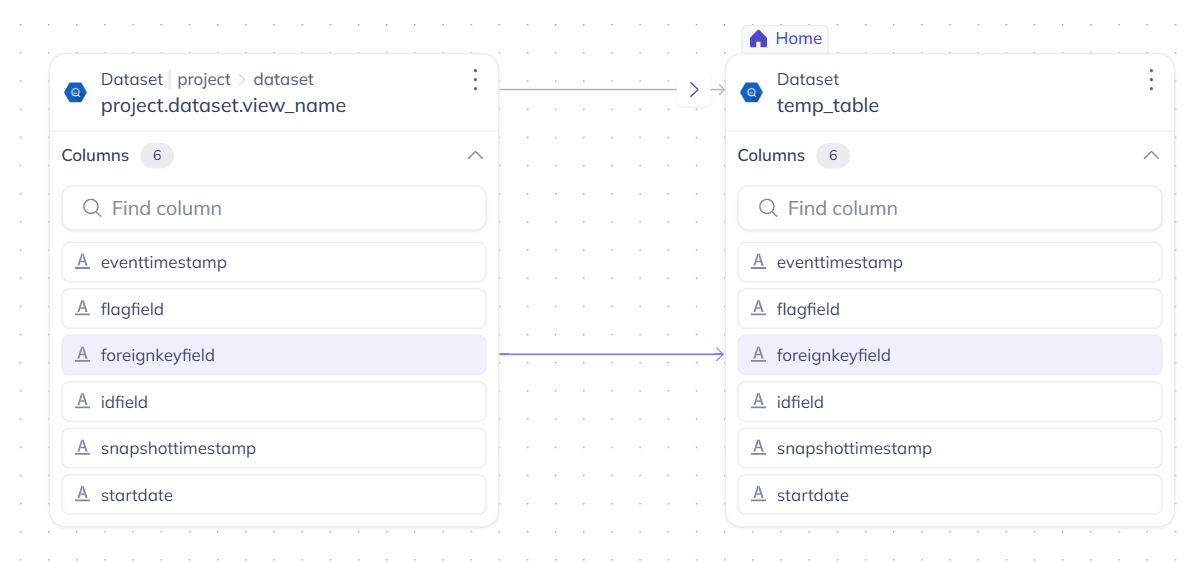
project.dataset.view_name→temp_table(6 columns)temp_table_delta→final_output(5 columns)
But when DataHub ingests this query, both relationships are lost.
Why it happens
DataHub’s BigQuery ingestion uses sqlglot for SQL parsing and lineage extraction. sqlglot handles standard SQL well — SELECT, INSERT, CREATE VIEW, joins, CTEs, window functions — but its BigQuery dialect does not support procedural language constructs.
When sqlglot encounters DECLARE, IF/THEN, or CALL, it falls back to an opaque Command node. The SQL inside the procedural block is not parsed, and no lineage is extracted. This isn’t a bug in sqlglot — procedural SQL is genuinely hard to parse, and full procedural language support is outside sqlglot’s current scope.
The result: DataHub silently drops lineage for any BigQuery query that uses procedural syntax. No error message, no warning in the UI — the lineage simply doesn’t appear.
This issue was first reported in October 2024 (datahub-project/datahub#11654) and remains open.
The fix: a post-processor sidecar
We built gsp-datahub-sidecar, an open-source (Apache 2.0) tool that recovers the missing lineage. It works as a post-processor alongside your existing DataHub ingestion — no changes to your DataHub installation required.
The sidecar re-parses the SQL that sqlglot couldn’t handle using Gudu SQLFlow, which supports procedural SQL natively across 20+ dialects, including BigQuery’s GoogleSQL. It then emits the recovered lineage to DataHub via the standard REST API.
DataHub ingestion (unchanged)       gsp-datahub-sidecar
  BQ audit log → sqlglot → lineage     |
                    |                   | re-parse procedural SQL
                    v                   | with Gudu SQLFlow
              "Command fallback"        v
              (lineage lost)      DataHub GMS (lineage restored)
The sidecar does not replace or interfere with sqlglot-generated lineage. It adds to it — filling the gaps that procedural SQL creates.
How to use it
Step 1: Install
pip install git+https://github.com/gudusoftware/gsp-datahub-sidecar.gitStep 2: Dry-run (no DataHub needed)
Preview the lineage that would be recovered:
gsp-datahub-sidecar \
  --sql-file examples/bigquery_procedural.sql \
  --dry-run
Output:
Processing 1 SQL statement(s) in 'anonymous' mode...
  Lineage: PROJECT.DATASET.VIEW_NAME --> TEMP_TABLE (12 columns)
  Lineage: TEMP_TABLE_DELTA --> FINAL_OUTPUT (5 columns)
[DRY RUN] Would emit 2 MCPs to http://localhost:8080
The two lineage relationships that DataHub was missing are recovered, along with 11 column-level mappings.
Step 3: Emit to DataHub
Point the sidecar at your DataHub GMS:
gsp-datahub-sidecar \
  --sql-file examples/bigquery_procedural.sql \
  --datahub-server http://localhost:8080
Step 4: Verify in DataHub
Open the DataHub UI and search for temp_table. The lineage tab now shows the upstream relationship from project.dataset.view_name, with column-level lineage arrows:
And for final_output, the lineage from temp_table_delta with all 5 column mappings:
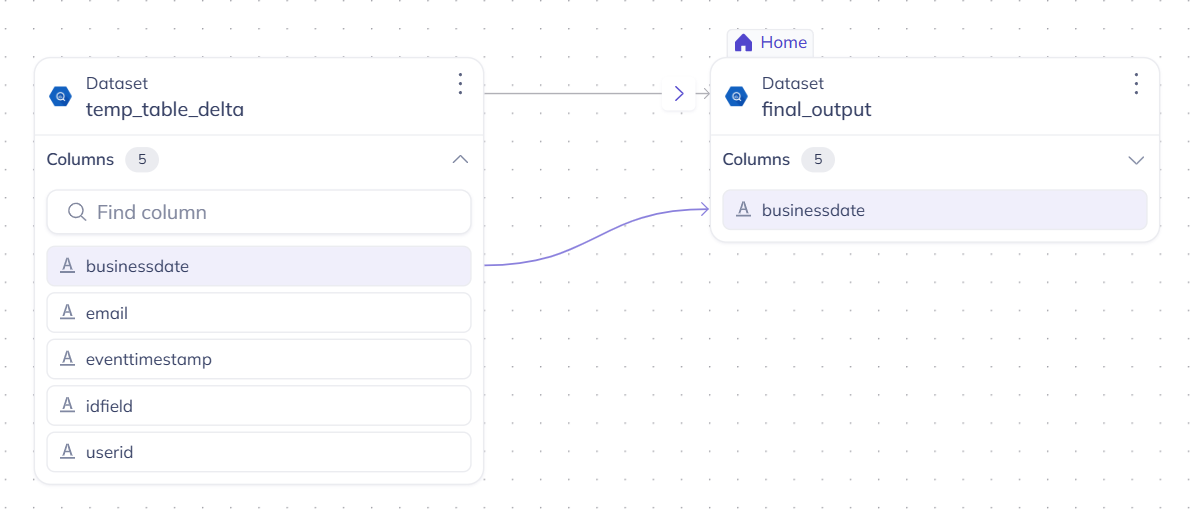
Both table-level and column-level lineage are fully visible in DataHub’s lineage graph — recovered from procedural SQL that was previously invisible.
Three backend modes
The sidecar supports three backends, depending on your security and volume requirements:
| Mode | Auth | Limit | Data location | Use case |
|---|---|---|---|---|
anonymous (default) |
None | 50/day | SQL sent to api.gudusoft.com | Quick evaluation |
authenticated |
userId + secretKey | 10k/month | SQL sent to api.gudusoft.com | Extended evaluation |
self_hosted |
userId + secretKey | Unlimited | SQL stays in your VPC | Production |
For production use with sensitive SQL, the self-hosted SQLFlow Docker keeps all data in your infrastructure — no SQL leaves your network.
What’s next
If you’re affected by datahub-project/datahub#11654 or similar lineage gaps in your DataHub instance:
- Try the dry-run with your own SQL files to see what lineage you’re currently missing
- Check the GitHub repo for full documentation, configuration options, and additional examples (including Oracle stored procedures)
- Sign up for the authenticated tier at docs.gudusoft.com/sign-up for higher volume evaluation
The sidecar is Apache 2.0 licensed. Gudu SQLFlow is a commercial product with a free evaluation tier. For questions or feedback, open an issue on GitHub or reach out at support@gudusoft.com.
Disclosure: This tool is built by Gudu Software, the team behind General SQL Parser and SQLFlow. We specialize in deep SQL parsing and data lineage across 20+ SQL dialects.